CleanBrowse for Chrome
Explicit images blurred. Ads gone. Right in Chrome.
A free Chrome extension that checks every image on your own computer, blurs anything explicit before you see it, and strips out ads and trackers. Works on Windows, Mac and Linux.
Free on the Chrome Web Store
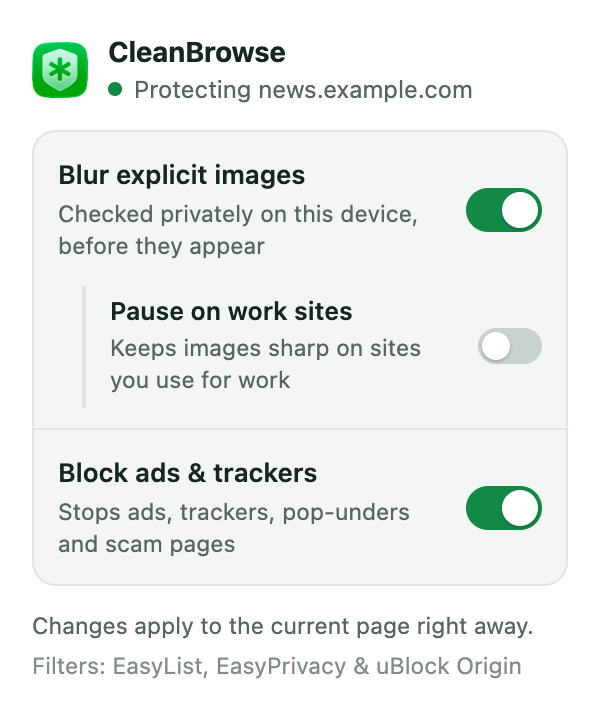
Three switches. That's the whole setup.
Explicit image blur
On-device AI checks every image and video in Safari and Chrome and blurs anything explicit before it appears.
Ad & tracker blocking
Cleaner, faster pages in Safari and Chrome. Ads, trackers, pop-unders and scam pages stopped before they load.
Work-site mode
Pause blur on the tools you work in — GitHub, Figma, Zoom — while every other site stays protected.
Privacy
Checked on your computer. Never uploaded.
The AI model ships inside the extension and runs right in Chrome. No image, no URL and no browsing history ever leaves your computer, and there's no account to create. If an image can't be checked, it stays blurred — you can still reveal it with a click.
Up and running in a minute.
- 1
Click Add to Chrome, then confirm.
- 2
Pin CleanBrowse from Chrome's puzzle-piece menu so its switches are one click away.
- 3
Browse as usual — images are checked before they appear, and ads are gone.
On a Mac? Go further with the app.
The free Mac app adds what no browser extension can: adult sites blocked in every browser and app, SafeSearch enforced on every search engine, and your choice of DNS provider.
Questions about the extension
Is the Chrome extension really free?
Yes. No account, no trial and no subscription.
Does it slow Chrome down?
No noticeable slowdown. The model uses your graphics card when Chrome allows it, and pages usually load faster once ads and trackers are gone.
Can I pause it on some sites?
Yes. Turn on the pause for work sites and the blur steps aside on the tools you work in — GitHub, Figma, Google Docs and more. You can edit that list, and switch ad blocking off from the same popup.
Which languages does it support?
English, Arabic, French, Spanish, German and Simplified Chinese.